 To track submission to/approval by Regulatory Authority for a
document (only document with 'Protocol' or 'Subject to
Regulatory Authority' type, select document to be tracked
(highlight it) and click on SUBMISSION in Study/Country Essential Documents
List.)
Select the desired document in higher part (List of Essential
Documents).
To track submission to/approval by Regulatory Authority for a
document (only document with 'Protocol' or 'Subject to
Regulatory Authority' type, select document to be tracked
(highlight it) and click on SUBMISSION in Study/Country Essential Documents
List.)
Select the desired document in higher part (List of Essential
Documents).Select a Regulatory Authority (for countries where there is no national regulatory authority, ADD icon is not available)
Regulatory Authority Name
If Regulatory Authority Name is missing in Regulatories Authorities, you have (if you have the right) to add the name at the country level in REGULATORIES option.
If you want to reset the entered information for a document, click on
 in Submission to
Regulatory Authorities toolbar => Regulatory
Authority Name, Submission Date, and Approval Date will be
cleared.
in Submission to
Regulatory Authorities toolbar => Regulatory
Authority Name, Submission Date, and Approval Date will be
cleared.List of Essential Documents
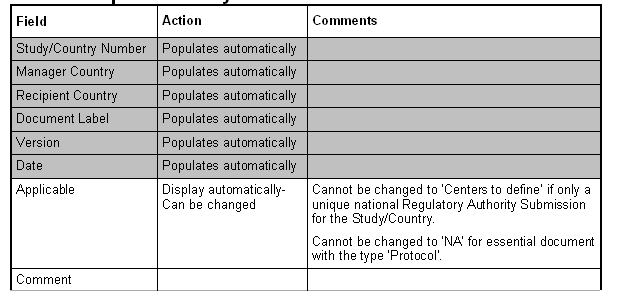
Enter Regulatory Authority
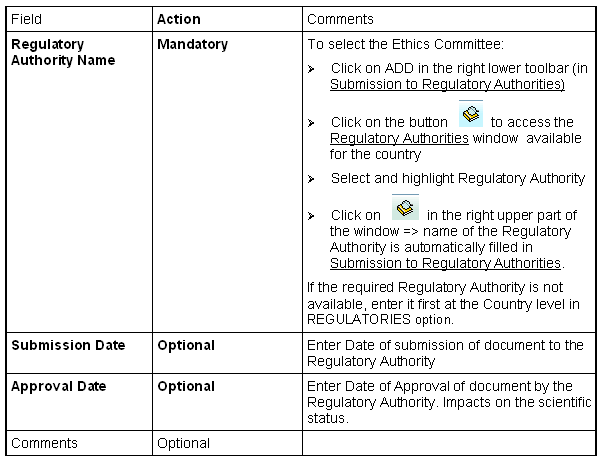
If Regulatory Authority Submission type is multiple for the national level, the ADD button in the right lower horizontal toolbar becomes active as soon as Regulatory Authority name has been entered for the first document; thus you can 'submit' the document to several Regulatories Authorities.
Option in Submission to Regulatory Authorities:
SELECT CENTER: only available if applicability is 'Centers to
define' (only possible if multiple Regulatories Authorities
defined for the Country)